Stream Deck Plugins
USEFUL KEYS FOR THE WORKFLOWSYOU RELY ON EVERY DAY
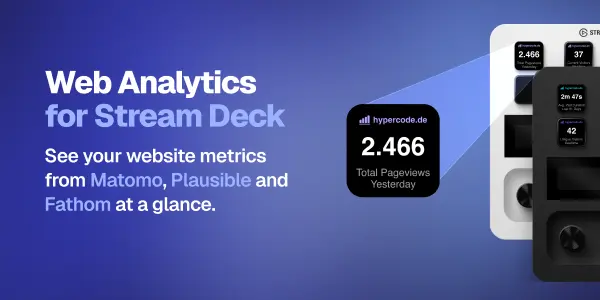
Wir schätzen das Elgato Stream Deck, weil es die Tools, Informationen und Aktionen, die wir täglich nutzen, direkt griffbereit macht. Jetzt bringt Hypercode awork, unsere liebste Projektmanagement-Software, auf das Stream Deck. Dazu kommen Web Analytics mit Tasten für die beliebten Analyseplattformen Matomo, Plausible und Fathom sowie Feed Key: So bleiben Websites, Kanäle, Repositories und Podcasts im Blick.

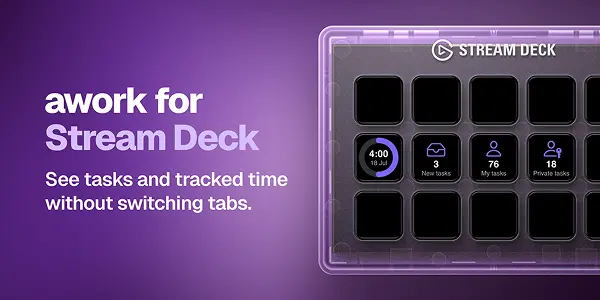
awork for Stream Deck zeigt Ihnen Ihre täglichen Aufgaben und erfassten Zeiten in awork. „Task Count“ zählt neue, eigene oder private Aufgaben. „Tracked Time Today“ zeigt Ihre erfassten Stunden im Verhältnis zur Tagesarbeitszeit. „Open awork AI“ öffnet awork AI – optional mit einem pro Taste hinterlegten Prompt.
Entdecken Sie auch unsere Extension awork for Raycast.
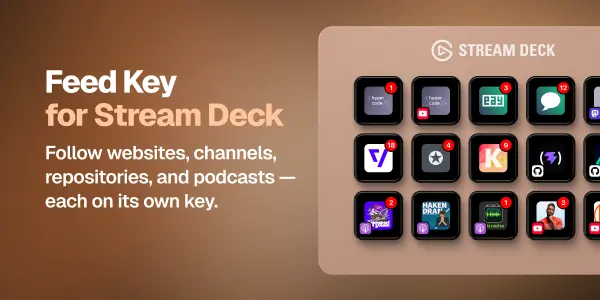
Feed Key for Stream Deck hält Sie über Neues auf Websites, Kanälen, Repositories und in Podcasts auf dem Laufenden. Weisen Sie jeder Taste eine Quelle zu. Die Anzahl neuer Einträge erscheint über dem zugehörigen Bild. Ein Tastendruck öffnet die Website der Quelle.

Welchen Ablauf möchten Sie vereinfachen? Wir entwickeln Stream Deck Plugins für die Tools, mit denen Ihr Team täglich arbeitet. Erzählen Sie uns, was Ihre Arbeit leichter machen würde.
Kontakt aufnehmenAnleitungen & Support
Wählen Sie ein Plugin aus, um mehr über Funktionen, Voraussetzungen und Einrichtung zu erfahren. Bei Fragen oder Verbesserungsvorschlägen wenden Sie sich an unser Support-Team.

awork for Stream Deck zeigt Ihnen Ihre täglichen Aufgaben und erfassten Zeiten. Mit „Task Count“ sehen Sie neue, eigene oder private Aufgaben („New Tasks“, „My Tasks“ oder „Private Tasks“). „Tracked Time Today“ zeigt, wie viele Stunden Sie heute bereits erfasst haben – gemessen an der eingestellten Tagesarbeitszeit. Mit „Open awork AI“ öffnen Sie awork AI in Ihrem verbundenen Workspace – auf Wunsch mit einem vorausgefüllten Prompt für einen neuen Chat.
Funktionen
- Zeigen Sie die Anzahl offener Aufgaben aus drei persönlichen Aufgabenansichten an.
- Behalten Sie die heute erfassten Stunden und den Fortschritt gegenüber Ihrer eingestellten Tagesarbeitszeit im Blick.
- Öffnen Sie die passende awork-Seite direkt vom Stream Deck aus.
- Öffnen Sie awork AI per Tastendruck, optional mit einem pro Taste gespeicherten Prompt.
- Legen Sie für jede Aufgaben- oder Zeittaste fest, wie oft die Anzeige aktualisiert wird.
- Melden Sie sich sicher über awork OAuth mit PKCE an.
Installation & Autorisierung
Legen Sie für das Plugin in awork unter (Workspace) Settings / Integrations / API clients einen API-Client an. Dafür benötigen Sie gegebenenfalls Admin-Rechte.
Verwenden Sie zum Beispiel folgende Werte:
- Name:
awork Plugin for Stream Deck - Client ID:
awork-streamdeck - Redirect URI:
https://oauth2-redirect.elgato.com/streamdeck/plugins/message/de.hypercode.awork/auth/callback(mit+hinzufügen)
Tragen Sie Ihre clientId in den Plugin-Einstellungen ein und wählen Sie Connect with awork. Melden Sie sich auf der awork-Seite an, die sich daraufhin öffnet. Anschließend kehren Sie zur Stream Deck Software zurück.
awork AI einrichten
Ziehen Sie die Aktion Open awork AI auf eine Taste. Tragen Sie in den Einstellungen dieser Taste optional einen Text in das Feld Prompt ein. Beim Drücken öffnet sich awork AI im Browser mit diesem Text als vorausgefülltem Prompt für einen neuen Chat. Bleibt das Feld leer, öffnet sich awork AI ohne Prompt.
Sie können mehrere AI-Tasten mit verschiedenen Prompts anlegen. Über das Feld Title in der Stream Deck Software geben Sie jeder Taste eine passende Beschriftung.
Voraussetzungen
- Stream Deck ab Version 6.9.
- macOS ab Version 12 oder Windows ab Version 10.
- Ein awork-Konto und eine Internetverbindung.
- Eine awork OAuth Client ID mit der in dieser Anleitung angegebenen Redirect URI.
Wenn Sie Hilfe bei der Einrichtung benötigen, erreichen Sie unser Support-Team über die oben angegebene E-Mail-Adresse.


Acknowledgements & Disclaimer
We are enthusiastic users of Stream Deck, awork, Matomo, Plausible, and Fathom ourselves. These tools make our daily work better, and the plugins grew out of workflows we use in our own team. Thank you to the people behind them for building products we enjoy using.
Nonetheless: These plugins are independent projects and are not affiliated with, associated with, authorized by, endorsed by, or in any way officially related to Elgato, awork, Matomo, Plausible, or Fathom. All related product names, marks, emblems, and images are trademarks of their respective owners.